Configure FOBOS observations
Provided an ascii text file with a columnated set of targets to be observed, the
fobos_makeplan script can be used to construct FOBOS configuration files,
one file per observation:
$ fobos_makeplan -h
usage: fobos_makeplan [-h] [-m [MODE ...]] [-c [COLUMNS ...]] [-a AP_TYPE]
                      [-r ROOT] [-o] [--min_n MIN_N] [--tile_only]
                      [--max_nobs MAX_NOBS]
                      target_file

FOBOS Observation Planning

positional arguments:
  target_file           Name of a file with targets to be observed

optional arguments:
  -h, --help            show this help message and exit
  -m [MODE ...], --mode [MODE ...]
                        The spectrograph mode. If None, mode is
                        determined/optimized based on the aperture types
                        identified in the target file. If a single integer, all
                        three spectrographs are put in the same mode. Otherwise,
                        must be 3 integers. Use mode=1 for single-fiber
                        apertures, mode=2 for IFUs. (default: None)
  -c [COLUMNS ...], --columns [COLUMNS ...]
                        Provide the columns with the RA, DEC, and aperture type
                        (optional) to use for each target. If the aperture type
                        is not provided in the file, it is assumed to be the
                        same for all targets and set by the --ap_type option.
                        (default: [1, 2])
  -a AP_TYPE, --ap_type AP_TYPE
                        If the aperture type is not available in the target
                        file, use this type for all targets. Aperture types must
                        be 0 for single fibers and 1 for IFUs. (default: 0)
  -r ROOT, --root ROOT  Root name for output field configuration files. If None,
                        based on the name of the provided target file. (default:
                        None)
  -o, --offset          Offset the default tiling by half the FOV (default:
                        False)
  --min_n MIN_N         Minimum number of objects in a tile to consider it
                        viable. (default: 0)
  --tile_only           Only show the tiling of the input coordinates. (default:
                        False)
  --max_nobs MAX_NOBS   Maximum number of times to revisit a FOBOS pointing to
                        acquire new targets. If None, pointings will be
                        revisited until there are no more objects to observe.
                        (default: None)
For the examples shown below, we use the data provided by
producer/data/examples/quiescent_sample.txt, quiescent galaxies selected
from the Laigle et al. (2016, ApJS, 224, 24) COSMOS
catalog. All commands below are performed in the producer/data/examples
directory.
Tiling
The planning script automatically tiles the provided data with a uniformly distributed
set of FOBOS pointings. To see the tiles, run with the --tile_only option:
fobos_makeplan quiescent_sample.txt -c 2 3 --tile_only
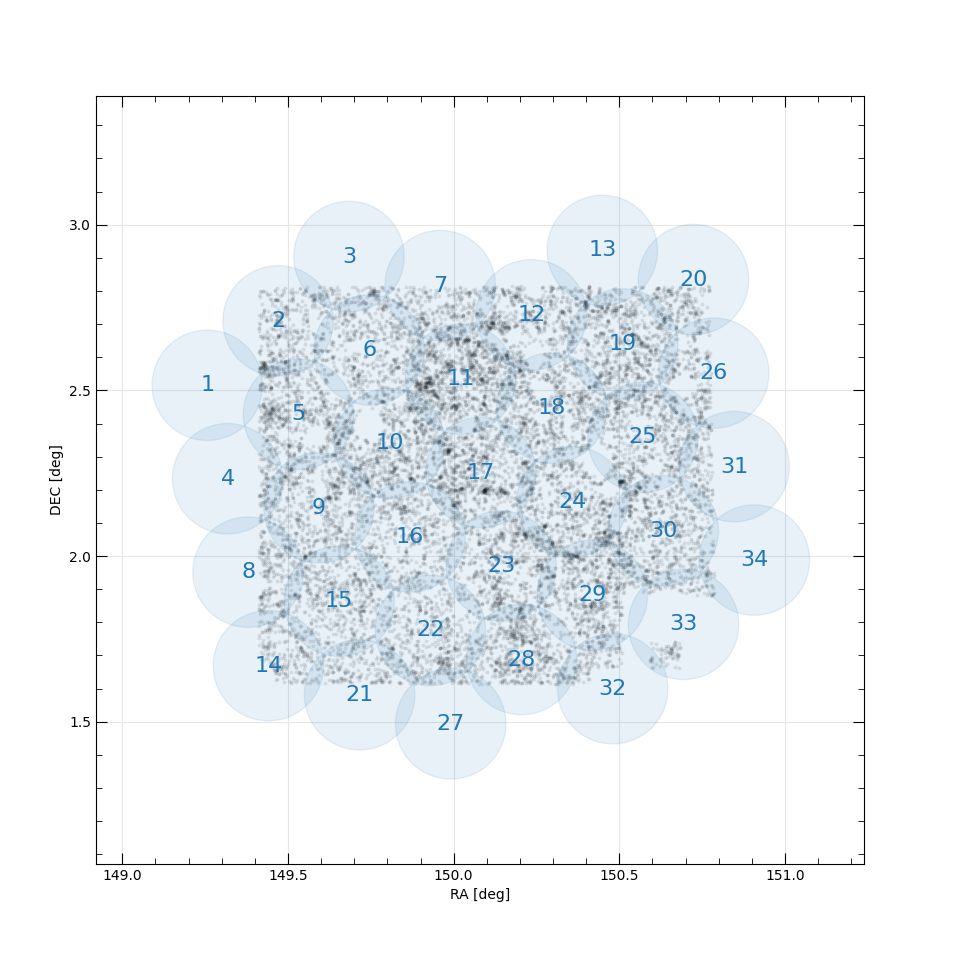
Uniform tiling of the sources in
producer/data/examples/quiescent_sample.txt. Sources in the catalog are
in light gray points, FOBOS pointings are in blue and identified by a running
index.
You can modestly alter the placement and inclusion of the tiles using the
--offset and --min_n command-line options. The above call results in 34
FOBOS tiles.
Aperture Assignment
After constructing the tiles, the fobos_makeplan script iterates through
each tile (pointing center) and allocates FOBOS apertures to sources. Each full
allocation results in an observation configuration file, and the default
approach is to revisit each pointing until all objects are allocated. (However,
targets can be allocated to multiple tiles; see Known issues.)
For example, the call
fobos_makeplan quiescent_sample.txt -c 2 3 -r ./quiescent_config/fobos_cfg
constructs configuration files with the root name fobos_cfg* and places them
in the ./quiescent_config directory, producing 135 (!) configurations.
For each tile, the script provides a report, like the following (along with listing the files that have been written):
----------------------------------------------------------------------
Allocating FOBOS apertures in tile 11.
Total number of targets available: 1446
Total number of pointings: 6

Pointing Avail Alloc  Compl    Eff MeanEff
-------- ----- ----- ------ ------ -------
       1  1630  1100 0.7607 0.6748  0.6748
       2  1630   268 0.9461 0.1644  0.4196
       3  1630    61 0.9882 0.0374  0.2922
       4  1630    13 0.9972 0.0080  0.2212
       5  1630     2 0.9986 0.0012  0.1772
       6  1630     2 1.0000 0.0012  0.1479
----------------------------------------------------------------------
In addition to a running index of the pointing number, the columns are:
Avail: The total number of science apertures available for allocation.Alloc: The number of apertures allocated to targets.Compl: The cumulative fraction of observed targets, relative to the total number available (see above the table).Eff: The “efficiency” of the observation, defined as the fraction of allocated science apertures compared to the total.MeanEff: The mean of the efficiency for this and all previous observations.
You can limit the allocation to a maximum number of revisits per tile using the
--max_nobs command-line option. For example,
fobos_makeplan quiescent_sample.txt -c 2 3 -r ./quiescent_config/fobos_cfg --max_nobs 1
will produce a single allocation (and configuration file) for each tile.
Configuration Files
FOBOS configuration files are human-readable ascii files with FOBOS configuration and aperture assignment details for a single acquisition. An example from the call above looks like this:
# FOBOS configuration file
#
# Generated: Wed 25 Aug 2021 09:18:11
#
# ----------------------------------------------------------------------
#
# [FOBOS_MODE]
# version = 0.1
# mode = 1,1,1
# baseline = True
# design = 1
#
# [TARGETS]
# source = /Users/westfall/Work/packages/fobos/producer/producer/data/examples/quiescent_sample.txt
# ra_col = 2
# dec_col = 3
# id_type = index
# allocated = 1100
#
# [POINTING]
# ra = 150.02079682
# dec =   2.53396330
#
# ----------------------------------------------------------------------
#
# Columns are:
#     MID - Module ID number
#     SID - Spectrograph ID number
#     BID - Starbug ID number
#     Type - Starbug payload type: (0) single-fiber, (1) 37-fiber
#            IFU, (3) imaging bundle, (4) flux-calibration bundle.
#     OBJID - Object ID
#     RA - Target right ascension (decimal degrees)
#     Dec - Target declination (decimal degrees)
#
# MID   SID   BID   Type   OBJID             RA           DEC
    4     1    15      0   14404   149.94378104    2.68068134
    4     1    16      0   14316   149.95233351    2.67466332
    4     1    17      0   14197   149.95084962    2.66581692
    4     1    18      0   14298   149.94494197    2.67279699
....
The header (the commented section) contains configuration information, including the spectrograph modes, the pointing center, and the original target catalog file. The columnated data provide the aperture assignments, with the columns described in the header.
Configuration Plot
The configuration file can be used to construct a plot of the FOBOS
configuration using the fobos_showcfg script:
$ fobos_showcfg -h
usage: fobos_showcfg [-h] [-f] config_file

Show FOBOS observation configuration

positional arguments:
  config_file  Name of the configuration file

optional arguments:
  -h, --help   show this help message and exit
  -f, --full   If available, re-read the file with the original targets used to
               generate the configuration and show them in the plot. (default:
               False)
For example, the calls to fobos_makeplan above create a file that can be shown as follows:
fobos_showcfg quiescent_config/fobos_cfg_11_1.db
This will only show the available and allocated apertures, and the positions of
the allocated targets. To get the positions of the unallocated targets, the
code needs to be able to access the original target catalog, which is parsed
from the header of the configuration file. If it can, you can include these in
the plot using the --full option:
fobos_showcfg quiescent_config/fobos_cfg_11_1.db --full
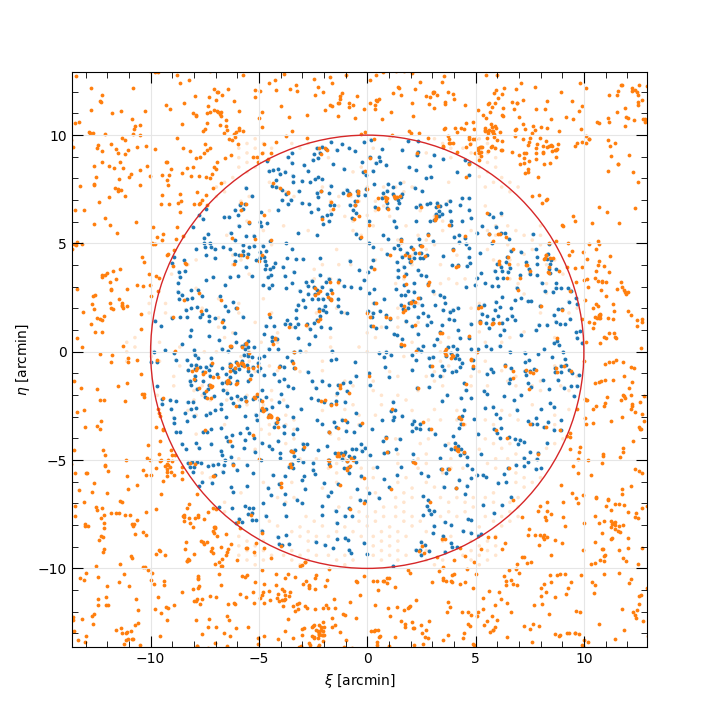
Allocation result for tile 11 in the FOBOS observing plan for the quiescent
sampled considered above. The red circle is the FOBOS field of view.
Allocated and unallocated targets are shown as blue and orange points,
respectively; plotting the latter requires the --full command-line
option. Apertures are plotted as shaded circles, where the size of the
circle represents the aperture collision radius (currently 10 arcsec).
Allocated apertures are shown in blue and unallocated apertures are shown in
orange. Note that the unallocated aperture positions are currently their
“home” position; however, these positions would need to be adjusted to avoid
collisions with allocated apertures.